You are at : Sonifex Ltd > Product Catalogue > D:Scribe Transcription Systems
Cards Accepted
 
D:Scribe Transcription Systems
D:Scribe Standalone Logo
D:Scribe Standalone is a package of PC transcription software together with a 3 pedal foot-controller, for simple, fast and effective transcription of pre-recorded audio files.

D:Scribe Standalone is the perfect transcription package to use for quick, simple voice-to-text conversion which can be used either with it’s own text editor, or which can “float” on top of another application, such as MS Word™.

D:Scribe Standalone has all the transcription features of the full Client & Server version, but doesn’t have the management database structure for multiple clients.

D:Scribe Standalone is ideally suited to self-employed transcribers, or small offices, where the original audio material is recorded off-site and distributed either electronically (e-mail) or by CD-ROM.

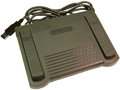
The audio controls for D:Scribe Standalone are the same as for the Client & Server version. A foot-pedal is supplied as standard with this package which controls the Play/Pause, Forward & Rewind buttons.

The online spell-checker is available and 12 user defined function keys can be used to enter repetitive material such as names, places and recurring events. The recorded time & date (if transcribing Net-Log audio files) and the current time & date are also available.

Finished transcripts can be simply emailed by clicking the on-screen email button, which runs your standard email client to send the text file.

Audio and Video Compatability
D:Scribe Standalone operates with all MS Windows Media Player™ standard file types : broadcast .wav, .wav, .aif, .aifc, .aiff, .asf, .asx, .wax, .wma, .wmv, .wvx, .wmp, .wmx, .avi, .mpeg, .mpg, .m1v, .mp2, .mp3, .mpa, .mpe, .mpv2 and .m3u.

MPEG and AVI video formats are also supported, allowing you to watch and transcribe video footage from an in-built video window.

D:Scribe Standalone can also playback G.729 compressed audio files that can be created by the Sonifex Net-Log Audio Logger.

In addition, D:Scribe Standalone is also capable of Audio CD (cda) playback, for direct transcription without the need for recording/ripping tracks to the hard disk. This is a useful feature if your recordings are of sensitive material and for security reasons you do not want copies stored on local hard disks.

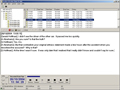
Standalone Edit Script
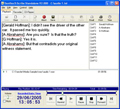
D:Scribe Standalone Playback and Transcript Screen

Foot-Controlled Playback & Function Key Text Insertion
Standard audio controls for transcription include Play, Pause, (Fast) Forward and Rewind by defined amounts. Holding the Rewind and Fast-Forward buttons makes them decrement and increment faster depending on your settings. Previous and Next buttons allow you to go to the previous and next recordings respectively, which is useful where a long session has been captured over a number of recordings. There are also volume & playback speed controls. The Play/Pause, Forward & Rewind buttons can be controlled with the optional DS-FPS3 or DS-FPU3 foot-pedals.

The transcription window has a spell checker and 12 user defined function keys can be used to enter repetitive material such as names, places and recurring events. The recorded time & date and the current time & date are also available.

Footpedal
D:Scribe Footpedal

Playback Controls
D:Scribe Playback Controls

Built-in Recorder
D:Scribe Standalone has a built-in audio recording screen, capable of recording to compressed MP3 or linear WAV files from any of the recordings sources of your soundcard including Line-In and Microphone.

The recording screen can be used to record audio files using manual start and stop, auto-start recordings using levels (VOX), and also auto-split recordings ranging from 30 seconds to 1 hour each.

Recorder Screen
D:Scribe Standalone Recorder Screen
Transfer Audio CDs
D:Scribe Standalone has a built-in audio CD ripping capability. This allows pre-recorded audio CDs to be transferred to your PC as compressed MP3 or linear WAV files for playback and transcription.

Ripper Screen
D:Scribe Standalone CD-Ripper Screen

DS-UP2 D:Scribe Standalone V1.0 to V2.0 Upgrade Features
After listening to our user-base, we have made several improvements to D:Scribe Standalone which are the changes from V1 to V2. Please note that because we’ve introduced a USB dongle to the newer version, there is a charge to allow for this in the upgrade.

  • Screen layout changes, including support for XP themes using the manifest
  • New trackbar allows start and stop marks (also can stop on end-mark)
  • Mute audio control added
  • ‘Stay On Top’ is now optional for compact and normal window size
  • Start Bar caption can optionally display Play Position, Recorded Time or Time Remaining
  • Insert List on right of transcript space instead of a status bar
  • Video Panel to left of transcript space
  • CD Ripper can optionally rip in WMA format
  • Play Speed – fast, normal, slow with constant pitch
    • Depends on soundcard, drivers, sample rate/format of files
    • Tested with MP3, WMA audio, WMV video
  • Play directly from audio CDs
  • MPEG4 video and audio playback (mp4, m4a files) (Requires third-party driver in WinXP)
  • Support for USB footpedal
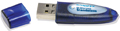
  • USB Dongle Protected (Without dongle – no save, no copy, recordings limited to 30secs, popup message every 2 minutes)
  • DVD / VOB playback
  • Option to control start/stop of recording process via footpedal
  • Option to swap FWD/REW pedals to suit user
  • Able to open audio/video files from http:// source (eg http://www.sonifex.co.uk/test/a.wmv)
  • Able to playback and record http:// streams
    • ASX and WVX streaming audio from Internet radio stations, e.g.
    • TalkSport http://194.46.8.124/talksport-live.asx
    • Northants 96 http://audio.musicradio.com/Playlist.asx?show=55
    • Record streamed audio (or audio from a streaming video) via ‘Stereo Mix’ source into MP3/WAV
Dongle
USB Dongle for D:Scribe Standalone


D:Scribe Client Server Logo
D:Scribe Client and Server is a transcription package designed for the retreival and archiving of recorded audio material from a Sonifex Net-Log audio logger, which can then be easily transcribed. Applications include transcriptions for police interviews, law courts, solicitors offices & council meetings.

D:Scribe Client and Server operates seamlessly with the Sonifex Net-Log audio logger. Audio recorded on one or more Net-Logs (maximum of 20 units, giving upto 80 audio channels) can be archived to a defined server IP address where audio files can be stored and logged. The audio files automatically appear in the database structure of D:Scribe Server with the recorded time and date available. Additionally, recording and archiving on the Net-Logs can be controlled from D:Scribe Server.

The D:Scribe Client and Server transcription package is ideally suited to larger installations where transcription of on-site recorded material is required.

Organisational Efficiency - Link Audio & Text Files Automatically
D:Scribe Client and Server is a software suite which runs under Microsoft SQL2000™ on MS Windows 2000 Server™. It provides an environment where pre-recorded audio files can be categorized, searched and then transcribed and is ideal for environments where you have multiple channels of audio recordings which need to be transcribed by many people on a network.

Recordings are stored in the D:Scribe Server software where they are categorised and made available to the attached Clients. Audio files are automatically linked to the transcriptions allowing you to systematically arrange and classify the stored information.

Client Playback Screen
D:Scribe Client Playback Screen

Quick & Simple Searching For Audio or Text From Your Desktop
The D:Scribe Client allows you to search for recorded audio by recorded Net-Log, recorded channel (which could be a particular microphone in a court, a channel on a recorded radio frequency, or a particular meeting room) or by recorded time and date. Once you find the audio that you wish to transcribe, you can take "ownership" of it (which will notify other Clients that you are working on it, if they try and transcribe it). You can then use either the software controls, or the optional foot-pedal, to begin transcription, in a dedicated text window.

Once transcription is finished, the text is available and is linked to the audio file. It can then easily be referenced, emailed or exported. You can globally search transcriptions for text, refining the audio files that you search, by Net-Log, recording day, channel, time and date, or script status (new, audio only, text only, audio & text, or open).

Client Search Screen
D:Scribe Client Search Screen

Foot-Controlled Playback & Function Key Text Insertion
Standard audio controls for transcription include Play, Pause, (Fast) Forward and Rewind by defined amounts. Holding the Rewind and Fast-Forward buttons makes them decrement and increment faster depending on your settings. Previous and Next buttons allow you to go to the previous and next recordings respectively, which is useful where a long session has been captured over a number of recordings. There are also volume & playback speed controls. The Play/Pause, Forward & Rewind buttons can be controlled with the optional DS-FPS3 or DS-FPU3 foot-pedals.

The transcription window has a spell checker and 12 user defined function keys can be used to enter repetitive material such as names, places and recurring events. The recorded time & date and the current time & date are also available.

D:Scribe Server contains Auto-Archive and Auto-Delete software so that you can define how long recorded audio files & scripts are stored on the server, e.g. files can be automatically removed after 30 days, eliminating an administration task.

Playback Controls
D:Scribe Playback Controls

Footpedal
D:Scribe Footpedal

Installation Notes
D:Scribe uses the latest audio and video processing techniques through use of the installed MS Windows Media PlayerTM. For MS-Windows 2000TM this is currently Windows Media Player 9 Series, and for MS-Windows XPTM this is currently Windows Media Player Version 10.

To download the latest Windows Media Player for your PC visit the Microsoft Windows Media Download Center

Pricing
Please contact your local distributor for latest pricing information.

For UK customers, and customers in areas where we do not have a distributor, please contact the sales department on +44 1933 650 700 or email sales@sonifex.co.uk.


Sonifex Ltd. 61 Station Road, Irthlingborough, Northants, NN9 5QE, UK.
Tel: +44 (0)1933 650700 Fax: +44 (0)1933 650726 EMail: sales@sonifex.co.uk